Overview:
Please do not place a request until you have funds in your ClassWish account. You will shop on the No Starch Press site to assemble an order, but you will not place your order with them. Rather, you will assemble the order and then email it to ClassWish for us to submit and pay for. Please follow these easy directions.
Please do not place a request until you have funds in your ClassWish account. You will shop on the No Starch Press site to assemble an order, but you will not place your order with them. Rather, you will assemble the order and then email it to ClassWish for us to submit and pay for. Please follow these easy directions.
1. Go to ClassWish.org to get your Account Balance and ClassWish ID#
- Log into http://ClassWish.org. Click “My Account” in the upper right corner of any page other than the home page. The third tab, “Donations Received and Requests Placed,” shows your balance.
- If you want more supplies than your balance allows, you can make a tax-deductible contribution to your own wish list before or immediately after you shop.
- Please make note of your ClassWish account number, which appears within the URL of your wish list page.
|
2. Select the books you need
|
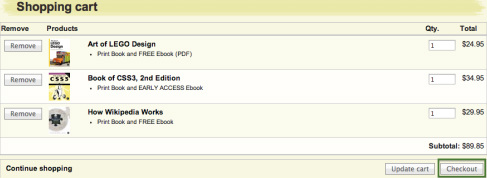
|
|
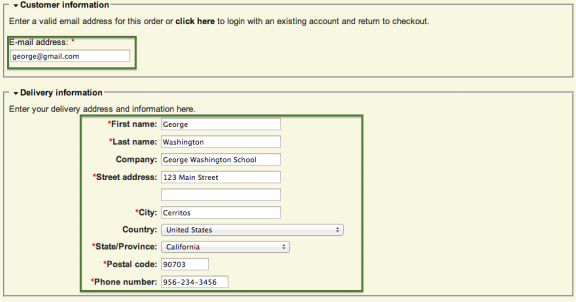
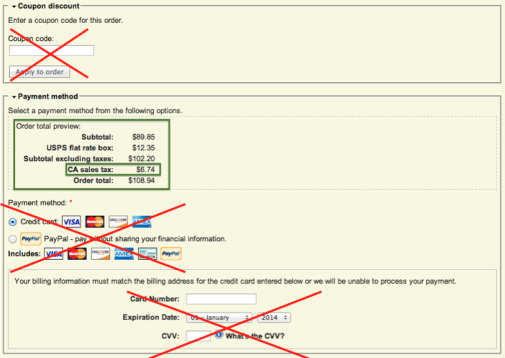
3. Checkout Page
Provide the information for this page. Customer Information:
Delivery Information:
Billing Information:
Shipping Cost:
Coupon Discount:
Payment Method:
Do not exit out of this page. You will need to copy the shopping cart into the Request Form as described below. |
|
|
4. Notify ClassWish
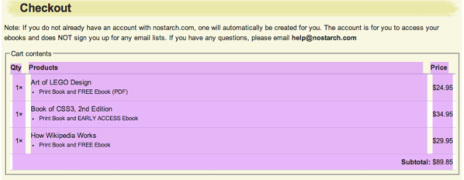
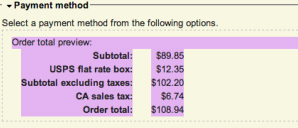
Download this Request Form; complete as instructed. Fill in the information on the first page of the Request Form. The second page will ask for you to paste in the contents of the shopping cart. Just follow these easy steps:
|
|
5. Add money to your ClassWish account if needed
If the total amount of your request exceeds your ClassWish balance:
If the total amount of your request exceeds your ClassWish balance:
- Please visit your ClassWish wish list page and make a tax-deductible donation to cover the shortfall.
- Be sure to gross up the amount of the shortfall to cover the credit card fee of 2.2% and 30 cents. Need help with the math? See this easy downloadable calculator.
6. What Happens Next
- So long as you have enough funds in your ClassWish account, we will deduct the order amount and pay No Starch Press.
- No Starch Press will ship the items to you at your school.
- You and your students will get the resources you need.
How to attract more donations:
People want to help kids. All you have to do is let them know your wish list exists. Use the social media buttons on your page to share via Facebook and Twitter; link to it from your blog; email it to friends; and see the link on your wish list page to more tips.
Please see ClassWish-Books.org where all book purchases earn a 10% discount and a 7.5% donation to provide resources for the shopper’s selected school or teacher. Please share this with parents and others you know. They will be delighted to save money and to help you get more resources. To help spread the word, please:
Please spread the word so we can help more kids
Finally, please help us help more teachers and students by spreading the word of ClassWish.org. We hope you will tell:
Now is the perfect time to do it!
Thank you very much for this opportunity to help!
Best wishes,
The ClassWish team
People want to help kids. All you have to do is let them know your wish list exists. Use the social media buttons on your page to share via Facebook and Twitter; link to it from your blog; email it to friends; and see the link on your wish list page to more tips.
Please see ClassWish-Books.org where all book purchases earn a 10% discount and a 7.5% donation to provide resources for the shopper’s selected school or teacher. Please share this with parents and others you know. They will be delighted to save money and to help you get more resources. To help spread the word, please:
- share it through social media
- ask your school to display on its website and display it on your own blog. Web banners are available here: http://www.classwish-banners.org/bookstore.html
- download this flyer and post it for all the teachers to see: http://www.classwish-banners.org/uploads/1/3/8/9/13894866/classwish-books_teacher_flyer_2014_10_06_a.pdf
Please spread the word so we can help more kids
Finally, please help us help more teachers and students by spreading the word of ClassWish.org. We hope you will tell:
- Teachers, parents and the PTA at your school
- Teachers in your union, in your district, and from your college
- Teachers you know or connect with on social media.
Now is the perfect time to do it!
Thank you very much for this opportunity to help!
Best wishes,
The ClassWish team
Have any questions? Just email us at Support [AT] ClassWish.org.
